Reporting security concerns in Okta helps protect your account and the organization from potential threats.
If you notice anything unusual—such as unexpected login prompts, multi-factor authentication requests you did not initiate, suspicious emails claiming to be from Okta, or changes to your account settings—you should report it immediately.
Do not approve unexpected sign-in requests or click suspicious links. Contact the RTC Service Desk or follow your organization’s security reporting process so the issue can be reviewed and addressed by the IT Security team.
Tutorial: Reporting on the Okta page
Step 1
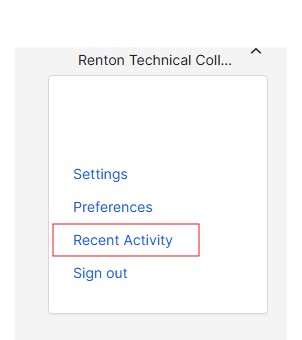
Click your name in the upper right corner in Okta and select Recent Activity.
Step 2
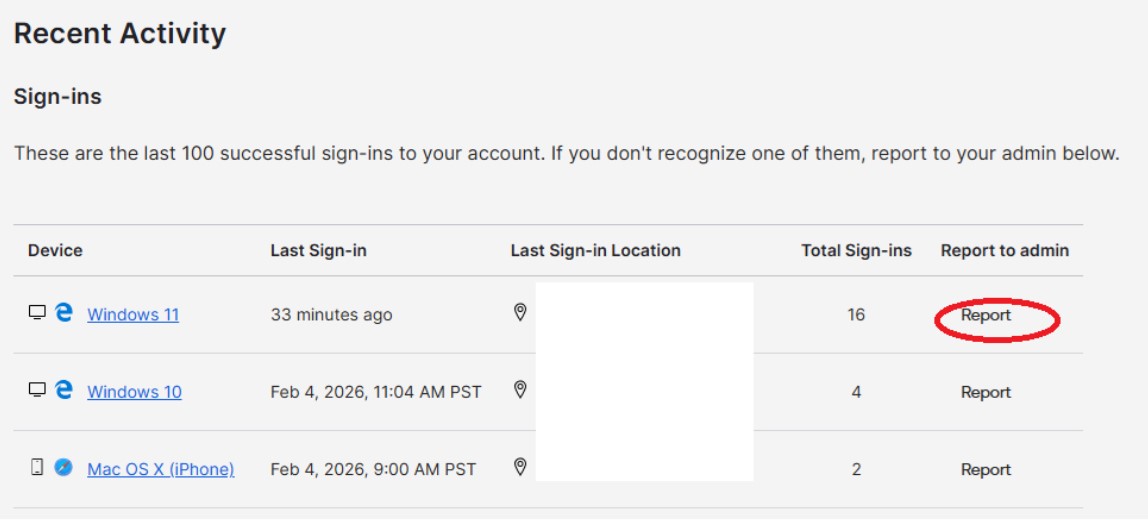
Review the activity list and report anything you do not recognize as yours.
Questions?
Please contact the RTC Service Desk.